Activity feed
The Activity Feed in the Partner Center CRM is a centralized feed that provides real-time updates on all sales activities across your organization. This powerful tool keeps your team informed about what's happening with prospects and enables better coordination between team members. Sales managers can quickly see activities at a glance to coach their team on calls or meetings. The Activity Feed serves as your single source of truth for all sales activities happening throughout your organization.
Why use the activity feed?
The Activity Feed eliminates information silos and ensures no important sales interactions are missed, enabling better team coordination and more effective sales management.
What's included
- Real-time updates on all sales activities across your organization
- Default filtering views: Pre-built filters for
All,Opportunities,Calls,Communications,Emails,Meetings,Notes, andRecorded Meetings - Custom view creation: Create and save your own filtering combinations for specific workflows
- Advanced filtering capabilities with date range, team member, and contact/company filters
- Keyword search functionality for activity content
- Centralized view for sales managers to coach their teams
Get started
-
Navigate to the activity feed
- Go to
Partner Center→CRM→Activity Feed - Access the centralized feed for all sales activities
- Go to
-
Use default filtering views
- Select from pre-built views:
All,Opportunities,Calls,Communications,Emails,Meetings,Notes,Recorded Meetings - Create custom views using the
Edit viewsoption - Apply additional filters within each view for refined results
- Select from pre-built views:
-
Review team activities
- Monitor real-time updates on sales activities
- Track what's happening with prospects across the organization
-
Use for sales management
- Coach team members based on visible activities
- Ensure no important interactions are missed
How to use the activity feed
Navigate to Partner Center → CRM → Activity Feed.
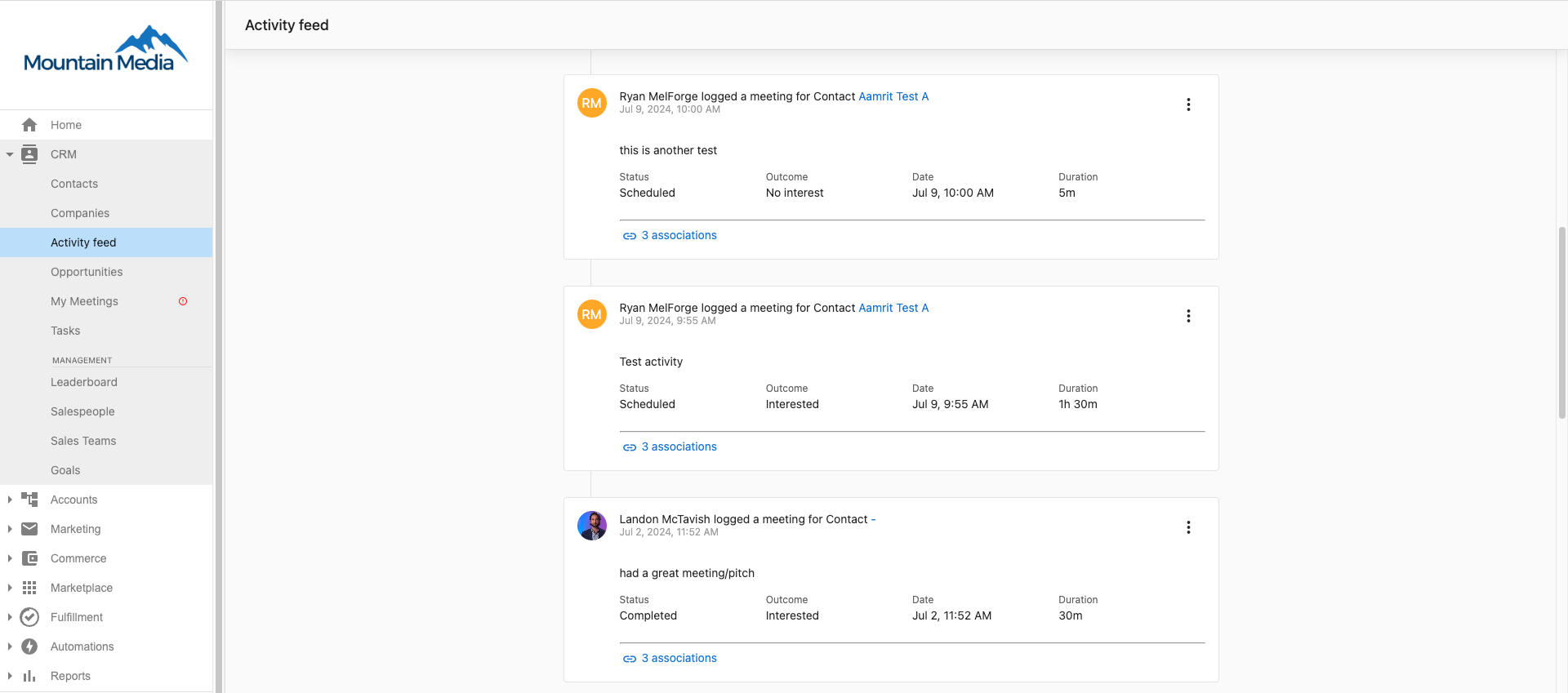
Default filtering views
The Activity Feed provides several pre-built filtering views to help you focus on specific types of activities:
Opportunities
Displays opportunity-related activities, including closed lost and closed won events.
Calls
Shows all logged phone call activities, including inbound, outbound, and call outcomes.
Communications
Displays general communication activities and interactions.
Emails
Shows email communications sent to/from contacts and companies.
Meetings
Monitors scheduled and completed meetings with prospects.
Notes
Displays logged notes and observations from team interactions.
Recorded Meetings
Shows meetings that have been recorded and analyzed by the meeting analysis tool
Custom views and advanced filtering
Creating custom views
Click Edit views to create personalized filtering combinations that match your specific workflow needs:
- Combine multiple criteria: Mix activity types, date ranges, team members, and keywords
- Save for future use: Create reusable views for recurring analysis needs
- Team-specific views: Build views tailored to different roles (sales managers, individual contributors, etc.)
Advanced filtering within views
Within any default or custom view, apply additional filters:
- Date Range: Filter by "Today", "This Week", "This Month", or custom date ranges
- Team Member: View activities by specific salespeople or teams
Practical use case examples
Sales Manager Workflow:
- Morning Pipeline Review: Use the
Opportunitiesview to quickly scan closed won/lost opportunities from the previous day, identifying successful patterns and areas for improvement - Weekly Team Analysis: Switch to
Recorded Meetingsview to review AI-generated summaries from the meeting analysis tool, ensuring important customer commitments are being followed up on - Coaching Sessions: Filter
Callsview by specific team member to review their phone activity and provide targeted coaching
What is the activity feed?
The Activity Feed in the Partner Center CRM is a centralized feed that provides real-time updates on all sales activities, so that your team can stay informed about what's happening with prospects in the organization. The Activity Feed is one place to stay in the loop for all the sales activities that happen across the organization, and is a quick way for a sales manager to see the sales activities at a glance so they can coach their team on their calls or meetings.
Activity feed features
The Activity Feed provides comprehensive visibility into your team's sales activities with powerful filtering and search capabilities:
Real-Time Activity Monitoring
- Live updates as team members log calls, send emails, and schedule meetings
- Instant visibility into prospect engagement across your entire organization
- Automatic capture of email activities and manually logged interactions
Multi-Layer Filtering System
- Activity Type: Filter by emails, notes, calls, or meetings
- Time-Based: Focus on specific date ranges or time periods
- People-Based: View activities by specific team members or contacts
- Content-Based: Keyword search across all activity descriptions and notes
- Status-Based: Filter by completed, scheduled, or overdue activities
Sales Management Tools
- Team activity dashboards for managers to monitor performance
- Activity volume tracking to identify coaching opportunities
- Prospect engagement history for context before important calls
- Opportunities with momentum tracking through activity frequency and types
Search and Discovery
- Full-text search across all activity content and notes
- Keyword tracking for product mentions, competitor discussions, and deal stages
- Advanced search combinations to find specific interaction patterns
- Quick access to related contact and company profiles
Frequently asked questions
Will this be available in Business App?
Yes, it will be available in Business App soon! Stay tuned for updates on how this will work.
How often does the activity feed update?
The activity feed updates in real-time as activities are logged. Email activities are captured automatically, while calls, meetings, and notes appear as soon as team members log them in the CRM.
Can I filter activities by multiple criteria at once?
Yes! You can combine multiple filters such as date range + team member + activity type to get very specific views of activities. For example, you can view "All calls from John Smith this week" or "All meetings with ABC Company this month."
What types of keywords can I search for?
You can search for any text that appears in activity descriptions, including:
- Product names (e.g., "Social AI", "Reputation AI")
- Competitor names
- Deal stages or terms (e.g., "proposal", "contract", "decision maker")
- Specific challenges or objections
- Contact names or company names
Can I see activities from deleted or inactive team members?
Yes, historical activities from former team members remain visible in the activity feed for continuity and record-keeping purposes.
How far back does the activity feed go?
The activity feed shows all activities from when the feature was enabled for your organization. There's no limit on historical data retention.