Multi-Location Business App Overview
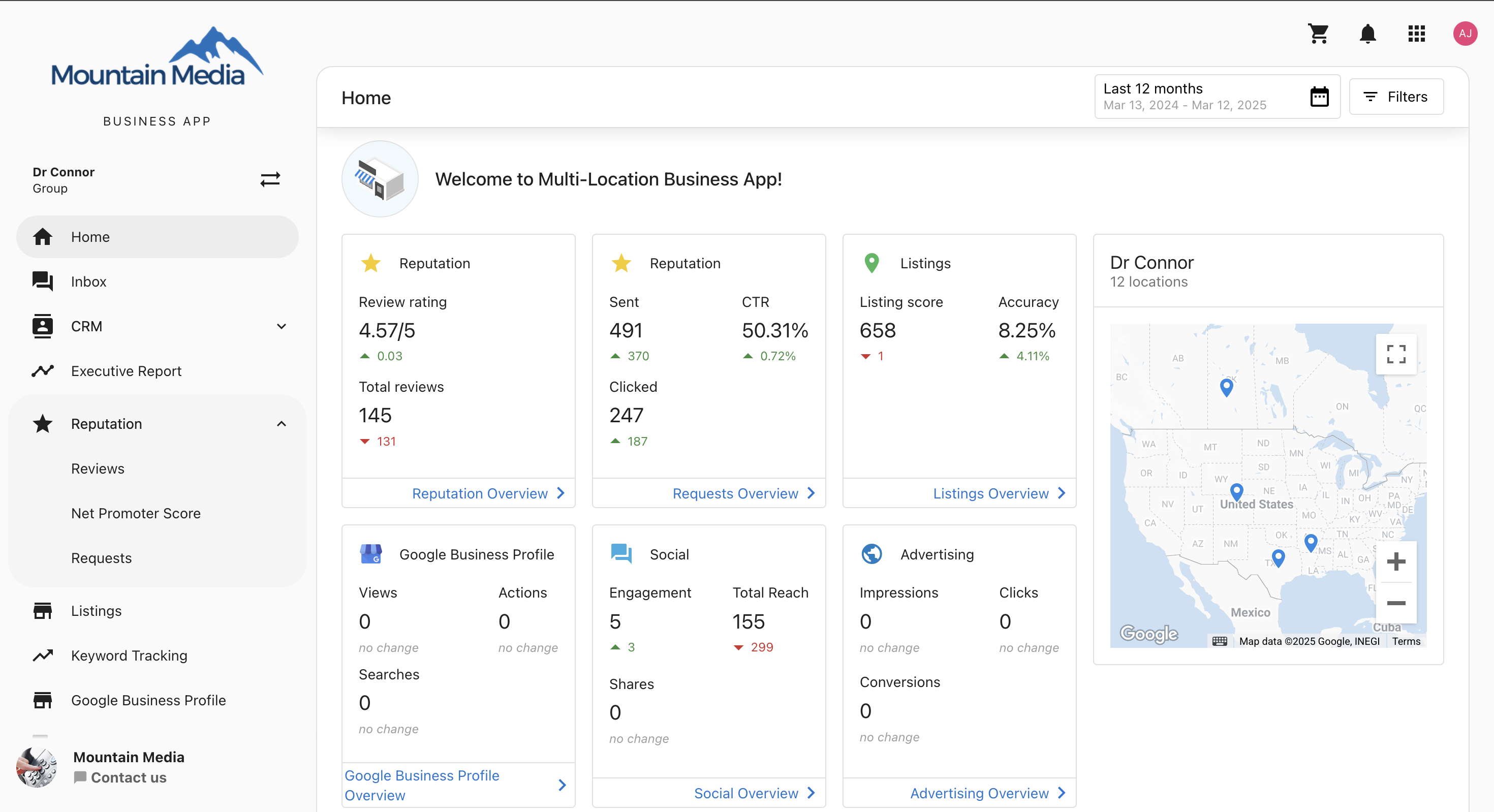
Multi-Location Business App is a portal where your clients manage and monitor multiple store or service locations from one interface, with business groups, aggregated dashboards, and cross-location reports. It's included in the Premium and Custom subscription tiers.
Get started with Multi-Location Business App
Ready to set up Multi-Location Business App for your clients? Start with the setup guide to configure business groups, import locations, and set up user permissions.
What is Multi-Location Business App?
The Multi-Location Business App gives businesses with multiple locations one central place to work. It's white-labeled, and customers can use it to:
- View aggregated performance data across all locations with unified dashboards
- Create and manage business groups for logical organization and hierarchy
- Monitor key metrics like leads, reviews, listings, and social media performance
- Generate executive reports with consolidated insights and custom reporting
- Manage communications across all locations from one unified interface
- Track advertising performance and ROI across multiple sites and campaigns
Why is Multi-Location Business App important?
Multi-Location Business App gives your clients one place to see and manage all their locations instead of managing each location separately. This helps them keep visibility and control across all locations as they grow.
Key Benefits:
- Centralized Management - Single dashboard for all locations with unified reporting and analytics
- Scalable Organization - Business groups and sub-groups that grow with your business
- Aggregated Insights - Aggregated metrics with individual location performance tracking
- Unified Communications - Manage customer interactions across all locations in Conversations
- Efficient Operations - Bulk actions and cross-location performance comparisons
What your customers can do
In Multi-Location Business App, your customers can:
- Monitor performance across all locations from a single, unified dashboard
- Create business groups to organize locations by geography, type, or custom criteria
- View consolidated reports with aggregated insights and location-specific data
- Manage customer communications across all locations from Conversations
- Track advertising campaigns and ROI across multiple sites and locations
- Export data for custom reporting and external integrations
- Set user permissions and location-specific access controls
- Compare performance between different locations and business groups
- Analyze trends with historical data and customizable reporting periods
What's included
Core features
- Getting Started Guide - Complete setup and configuration guide
- Multi-Location Notifications - Custom notification solutions using automations
- Home Dashboard - Central overview with key metrics across all locations
Communication & customer management
- Conversations - Manage communications across all locations in one place
- CRM - Consolidated contact management and lead tracking across multiple locations
- Customer Interactions - Centralized communication workflows with filtering and routing
Analytics & reporting
- Executive Report - Reporting with location-specific and aggregated insights
- Performance Tracking - Individual location and cross-location performance comparisons
- Data Exporter - Data export for custom reporting and external integrations
Marketing & advertising
- Social Media Management - Social media posting, engagement tracking, and performance analytics
- Advertising Management - Campaign management and performance tracking for location-based advertising
- Multi-Location Campaigns - Coordinated marketing efforts across all locations
Reputation & online presence
- Reputation AI - Review monitoring, response management, and reputation tracking
- Listings Management - Google Business Profile, Bing Places, and directory listing management
- Online Presence - Centralized management of digital footprint across all locations
Administration & configuration
- Business Groups - Organize locations by geography, business type, or custom criteria
- User Management - Set permissions and location-specific access controls
- Bulk Operations - Perform actions across multiple locations simultaneously
Getting help
For additional resources and detailed configuration guides:
- Getting Started Guide - Step-by-step setup and configuration instructions
- Multi-Location Notifications - Custom notification solutions and automation setup
- Partner Center Overview - Access admin controls and client management tools
- Business App Documentation - Complete in-application guides and user tutorials
Best practices & support
For optimal Multi-Location Business App implementation:
- Group Organization - Use consistent naming conventions and organize by logical business criteria
- User Management - Assign appropriate permission levels and create location-specific access when needed
- Reporting Strategy - Establish regular reporting schedules and customize reports for different stakeholder needs
- Ongoing Optimization - Regular audit of user permissions, group structures, and reporting effectiveness
Each Multi-Location Business App module is designed to scale with your client's business growth. Click on any section above to learn more about specific features, setup requirements, and configuration options.
Frequently asked questions
General setup & configuration
If a user is added to a multi-location group, will they receive daily digest emails for each account in the group?
No, multi-location groups are designed for viewing aggregated statistics, not for notifications. Daily digest emails still come from individual accounts and their associated users. Users must be added to the individual accounts separately to receive daily notifications from those accounts.
Will custom product names show up in the multi-location dashboard?
No, the multi-location dashboard does not support custom product names. Instead, you'll see generic menu items such as Reputation, Listings, Social, and Advertising.
CRM
What areas of the CRM can multi-location groups access?
Multi-location users can access the Contacts and Tasks from the locations that make up the group.
Conversations
How long does it take for conversations to load after enabling Multi-location Conversations?
The loading time varies depending on the number of accounts and conversations being aggregated. It can take anywhere from a few seconds to several minutes. There is no completion notification, so we recommend checking back after a few minutes to see if all conversations have loaded.
Keyword management
Can I add more than 15 keywords at once using bulk add?
No, the limit is 15 keywords per bulk addition. However, you can repeat the process multiple times to add more keywords as needed.
What happens if a location has reached its keyword limit?
Keywords will be skipped for locations that have reached their limit, but they will still be applied to other locations that have available quota. You'll receive a summary showing which keywords were not applied and why.
When will I see bulk-added keywords appear in the system?
Changes are reflected in the Multi-Location Business App within 24 hours after bulk addition.
Will keywords be automatically favorited when bulk added?
Yes, but only if the admin settings for favoriting and syncing are enabled in your account configuration.
Does the order of keywords matter during bulk addition?
Yes, keywords are applied in the exact order you enter them until each location's keyword limit is reached. Plan your keyword priority accordingly.
Can I remove keywords in bulk like I can add them?
No, the bulk feature is only available for adding keywords. Keywords must be removed individually from each location.
Will I get a report of which keywords were successfully applied?
Yes, the system tracks and reports which keywords were successfully added to each location, including any failures with explanations.
Subscription & access
What subscription tier do I need to access the Multi-Location Business App?
The Multi-Location Business App is included in Premium and Custom subscription tiers only. It is not available on Free, Starter, Essentials, or Professional plans.
If you don't see the Multi-Location Business App in your Partner Center, your current plan likely doesn't include it. Contact your assigned Vendasta representative to discuss upgrading your subscription.
Once access is enabled, you can find the Multi-Location Business App by going to Partner Center → Accounts → Multi-Location Groups.