Billing terms – line item scheduling
What are billing terms?
Billing terms let you define the start date and number of renewals for individual line items in an order. This ensures products are automatically activated on the scheduled start date and deactivated at the end of their defined term.
Billing terms also integrate with Vendasta Payments, enabling automatic collection and cessation of retail payments. This removes the need to manually schedule activations, reminders, or multiple orders.
What you can do with billing terms
- Schedule product activation for a future date
- Set fixed durations by limiting the number of renewals
- Automate billing and deactivation
- View billing schedules through the
Retail Subscriptionstable
How to set up
You can set billing terms on a line item in two ways:
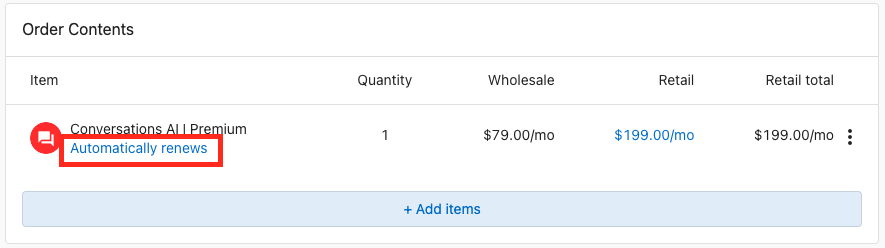
Option 1: Use the Automatically Renews hyperlink
- In an order, click the blue
Automatically Renewshyperlink below the product name. - A modal will open with configuration options for start date and renewals.
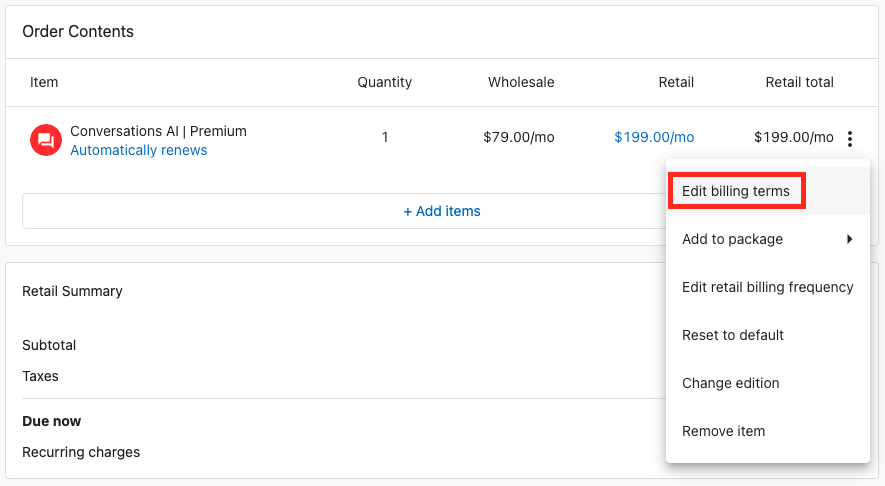
Option 2: Use the kebab menu
- Click the kebab icon (
⋮) on the line item. - Select
Edit Billing Termsfrom the menu. - The same modal will open to adjust billing terms.
Both options open the same modal for configuring the start date and renewals:
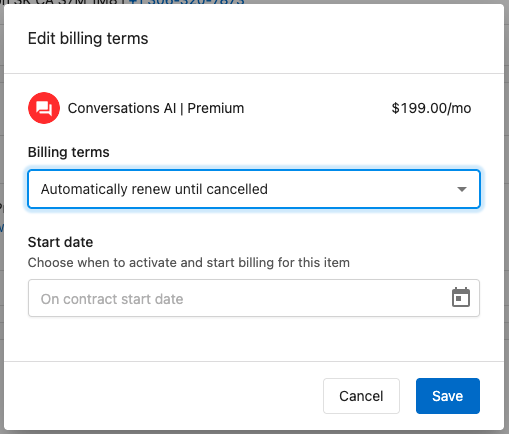
Once applied, billing terms appear under the line item.
What happens when you set billing terms?
Setting a start date on a line item
- The product will not activate until the defined start date.
- When the order is processed:
- Retail subscriptions are created in a pending state.
- Activation occurs automatically on the scheduled date.
If using Vendasta Payments:
- The product will be charged or invoiced (based on account billing settings).
- The product will activate.
If not using Vendasta Payments:
- The product will still activate, but no automatic billing occurs.
Setting a fixed number of renewals (end date)
- A set number of renewals defines the end date of a product.
- After the final renewal:
- The product is deactivated.
- Retail subscriptions end.
- All associated billing stops (if applicable).
FAQs
When do other items on an order become active if there is no set date?
Any items without a set start date will activate upon the order’s contract start date or at the time the order is processed.
Can I change a start date after the order is processed?
No, the order cannot be edited after processing. However, you can unschedule the activation and submit a new order with updated billing terms.
What happens to products on their end date?
The product is deactivated. It becomes inaccessible, and data associated with it is removed.
How can I see when items are scheduled to start or end?
Use Retail Subscriptions. The Subscriptions table shows scheduled activations and end dates across all accounts. This is also visible on the Products and Retail Subscriptions tabs within each account.
What is a contract start date and duration, and how are they different?
- Contract start date schedules when an order, and all its items, begin.
- Contract duration is for internal record keeping and does not affect product deactivation.
- You can create automations to notify when an order nears its contract expiry.