Managing Payouts
Payouts in Partner Center Commerce transfer the revenue your clients pay through Vendasta Payments to your bank account on a schedule set by Stripe. You can check payout status at Partner Center → Commerce → Payouts.
What are Payouts?
Payouts automatically transfer your earned revenue from Partner Center Commerce to your designated bank account. When customers pay for your services through Vendasta Payments, those funds are processed and then paid out to you according to your configured payout schedule and bank account settings.
Why are Payouts important?
Payouts ensure you receive your earned revenue in a timely and reliable manner. The system handles currency conversions, manages multiple bank accounts for different currencies, and provides transparency into when you can expect to receive your funds. This automated process eliminates the need for manual payment collection and provides predictable cash flow for your business.
What you can do with Payouts
With the Payouts system, you can:
- Configure one or multiple bank accounts for receiving payments
- Set up bank accounts for different currencies to avoid conversion fees
- Track the status of current and past payouts
- Monitor upcoming payout schedules
- View detailed payout history and transaction breakdowns
- Update bank account information when needed
How do I check payout status?
To check your payout status:
- Navigate to
Partner Center→Commerce→Payouts - View upcoming payouts and funds in transit at the top of the page
- Review the breakdown of all payouts and their status below
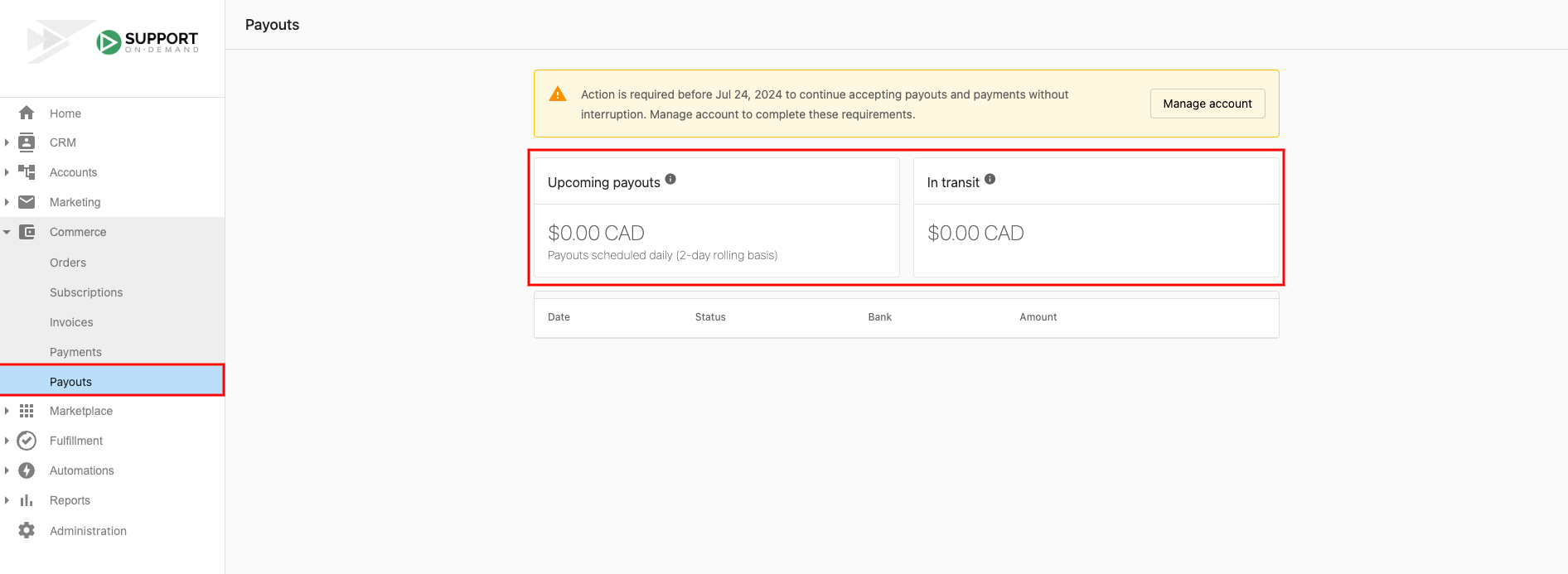
Your payout status will show:
- Upcoming payouts - Scheduled future transfers
- In transit - Payments currently being processed
- Completed - Successfully deposited payments
- Processing - Payments being handled by your bank
When will I receive my payouts?
Your payout schedule is determined by Stripe based on your location, currency, transaction history, and industry — not by Vendasta.
Timeline expectations:
- First payout: Approximately 7 days after adding your bank account and receiving your first successful payment. Some industries may see a 14-day initial delay.
- Regular payouts: Between 2 and 7 business days after the first payout, on a rolling schedule.
Changing your payout setting to "daily" updates your future payout schedule — it does not send a payout immediately.
Vendasta does not control payout timing. If you need faster access to funds, contact your bank to ask about Instant Payout options, subject to your bank's approval.
What if my payout is delayed or missing?
If a payout hasn't arrived by its expected delivery date, several factors could be involved. Only partners who connect their own Stripe account (Bring Your Own Stripe) can access the Stripe dashboard; if you use a Vendasta Payments account, contact billingsupport@vendasta.com for help with any of these.
Payout date changed and postponed: Your next expected payout date has been updated due to account verification issues. Check your Stripe dashboard and email for any requested additional information.
Payout missing (less than 5 business days): Your payout has left Stripe and is being processed by your bank. Banks may add extra processing days, including weekends and holidays.
Payout missing (more than 5 business days): Contact your bank with the following information: bank account details, expected date, exact amount, and payor (Stripe). See How to check the status of a payout with your bank.
If your bank cannot locate the missing payout after 5 business days, contact Stripe support.
What if my bank account details are incorrect?
Bank account updated during transit: If you update your bank account while a payout is in transit, it will go to your old bank account.
Incorrect details entered: If you connected your own Stripe account (Bring Your Own Stripe), you can update your bank account details from your Stripe Dashboard. If you use a Vendasta Payments account, contact billingsupport@vendasta.com.
Closed bank account: If your payout is sent to a closed account, it will return to your Stripe account automatically.
What is a reserve on my account?
A reserve is a portion of your funds that Stripe temporarily holds to mitigate potential risks. This can affect your payout schedule and amounts. If you connected your own Stripe account, check your Stripe dashboard for details about any reserves on your account; otherwise, contact billingsupport@vendasta.com.
Which countries support Vendasta Payments?
Vendasta Payments supports these countries: US, CA, AU, GB, NZ, CZ. If your billing contact country setting is outside these six, you will see "Vendasta Payments is currently unsupported in your area."
Why is my payout amount lower than expected?
Your payout represents the net amount after the following are deducted from your Stripe balance:
- Stripe processing fees — Charged per transaction (e.g., credit card fees, ACH fees). These are deducted before funds are added to your balance.
- Refunds issued — Any refunds you have issued to clients reduce your available balance.
- Chargebacks — Disputed payments that were decided in the client's favor are deducted, along with any associated dispute fees.
- Reserves — Stripe may hold a portion of your funds temporarily as a reserve to cover potential risk. If you connected your own Stripe account, check your Stripe dashboard for details; otherwise, contact billingsupport@vendasta.com.
To review the breakdown of a specific payout, navigate to Partner Center → Commerce → Payouts and click the payout to see its transaction details.
What happens to my payouts if my account is suspended?
If your Vendasta Payments account is suspended, payouts are paused until the suspension is resolved. Funds already in your Stripe balance are held and will be released once the account is back in good standing.
To resolve a suspension, contact billingsupport@vendasta.com for assistance.
When will I receive my first payout?
Your first payout arrives approximately 7 days after you add your bank account and receive your first successful payment. Some industries may see a 14-day initial delay. After that, payouts arrive between 2 and 7 business days on a rolling schedule.
Can I get my payouts faster?
Vendasta does not control payout timing; Stripe sets your schedule. Changing your payout setting to "daily" updates your future payout schedule but does not send a payout immediately. For faster access to funds, contact your bank to ask about Instant Payout options, subject to your bank's approval.
Can I receive payouts in more than one currency?
Yes. You can configure one or multiple bank accounts, including bank accounts for different currencies to avoid conversion fees.