Order Configuration and Administration
What are Order Configuration and Administration?
Order configuration and administration encompasses the setup and management of order workflows, user permissions, fulfillment processes, and system settings that control how your team creates and manages orders. This includes configuring salesperson capabilities, setting up fulfillment forms for additional customer information, managing email notifications, and establishing permission levels across different user roles.
Why is Order Configuration Important?
Proper order configuration ensures your team operates efficiently while maintaining appropriate controls and quality standards. By configuring workflows, permissions, and processes to match your business needs, you can streamline operations, reduce errors, and ensure compliance with your business practices. Configuration flexibility allows you to tailor the system to your specific sales processes and team structure.
What You Can Do with Order Configuration
With order configuration and administration, you can:
- Configure order workflows and submission processes
- Set up user permissions and access levels
- Enable or disable specific order features for different user types
- Create and manage fulfillment forms for gathering customer information
- Customize email notifications for order processes
- Configure payment collection capabilities
- Set up default content and custom forms
- Manage Terms of Service for customer approvals
- Control salesperson actions and capabilities
The Orders workflow in Partner Center was redesigned in July 2025. If you see references to the older "Sales Orders" flow, the steps may differ from your current interface.
How to Set Up Order Configuration
Accessing Order Configuration
To access order configuration settings:
Partner Center → Administration → Order Settings
Standalone products vs. packages-only
By default, salespeople can add individual (standalone) products to orders. To restrict salespeople to selling only packages:
- Go to
Administration→Order Settings - Under For Salespeople, enable "Prevent salespeople from selling standalone products on opportunities and orders"
When this is on, salespeople can only add pre-configured packages to orders. Admins are not affected by this restriction.
Company category limit for order submission
Orders created from a CRM Company profile require the company to have 10 or fewer business categories assigned. If you cannot submit an order from a Company, check the company's category count:
- Open the Company record in
CRM→Companies - Review the categories listed on the profile
- Remove categories until 10 or fewer remain, then retry submitting the order
Ad spend (variable pricing) in packages
Products with variable pricing — such as ad spend for digital advertising products — cannot have their amount adjusted when bundled inside a package. The ad spend amount is locked to whatever value was set when the package was configured.
Workaround: If you need to set a custom ad spend amount, order the product as a standalone item outside of the package. Standalone orders allow the variable amount to be set per order.
Workflow Configuration Options
For Salespeople:
- Remove Terms and Conditions when resending orders for customer approval
- Allow edits to order forms until activation
- Require salespeople to complete all fields before sending orders
- Prevent salespeople from selling standalone products on opportunities and orders
- Prevent salespeople from adding tags to orders
- Allow customers to send orders to admins directly from the Store
Salesperson Submit Actions:
- Allow salespeople to submit orders directly to admins
- Allow salespeople to charge saved payment methods upon order submission
- Allow salespeople to send orders to customers for approval
- Enable orders sent for approval to accept payment
Admin Submit Actions:
- Allow admins to bypass approval workflow and activate orders instantly
Default Content:
- Add custom forms to every order for internal use only
- Custom fields are not shared with vendors
Customer Terms of Service:
- Customize Terms of Service that appear when sending orders for customer approval
Email Notifications:
- Contract Awaiting Approval (sent to customers)
- Order Processed
- Order Declined
User Permissions and Access Levels
Salespeople Capabilities
Sales users have the ability to:
- Create and send orders
- Archive draft orders
- Edit orders until submission
- Request cancellation
- Resubmit declined orders
- Instantly charge or send orders for approval (based on settings)
- Charge orders in markets they can access, including all markets when their user access is configured for all-market coverage
Admins without "Can Manage Orders" Permission
- Have the same access level as salespeople
- Cannot approve, decline, or activate orders
- Can create and edit orders like sales users
Admins with "Can Manage Orders" Permission
In addition to salesperson capabilities, they can:
- Approve, decline, and cancel orders or cancellation requests
- Activate and archive draft orders
- Edit submitted orders up until activation
- Enter CC emails and charge instantly (when using Vendasta Payments)
- Send orders for customer approval with payment collection (when using Vendasta Payments)
Admins with "Can Manage Marketplace" Permission
- Gain visibility into wholesale pricing and summaries on orders
- Can view cost information not available to other users
Admins with "Can Manage Company Billing" Permission
- Can enter a company credit card if none is present on the order
- Can manage billing-related aspects of order processing
Fulfillment Forms
What are Fulfillment Forms?
Fulfillment Forms are used for obtaining additional details from customers to complete orders. When creating an order in Partner Center, you can select a form to be filled out and submitted to receive information needed to fulfill the order.
How to Set Up Fulfillment Forms
During Order Creation:
- Create your order in Partner Center
- Navigate to the Fulfillment Form section
- Select the appropriate form for the order
- Submit the order to trigger form delivery
Customer Experience:
- Customer receives email and notification with form link
- Customer completes the form with required information
- Customer can share form with others who have additional information
- Customer submits completed form
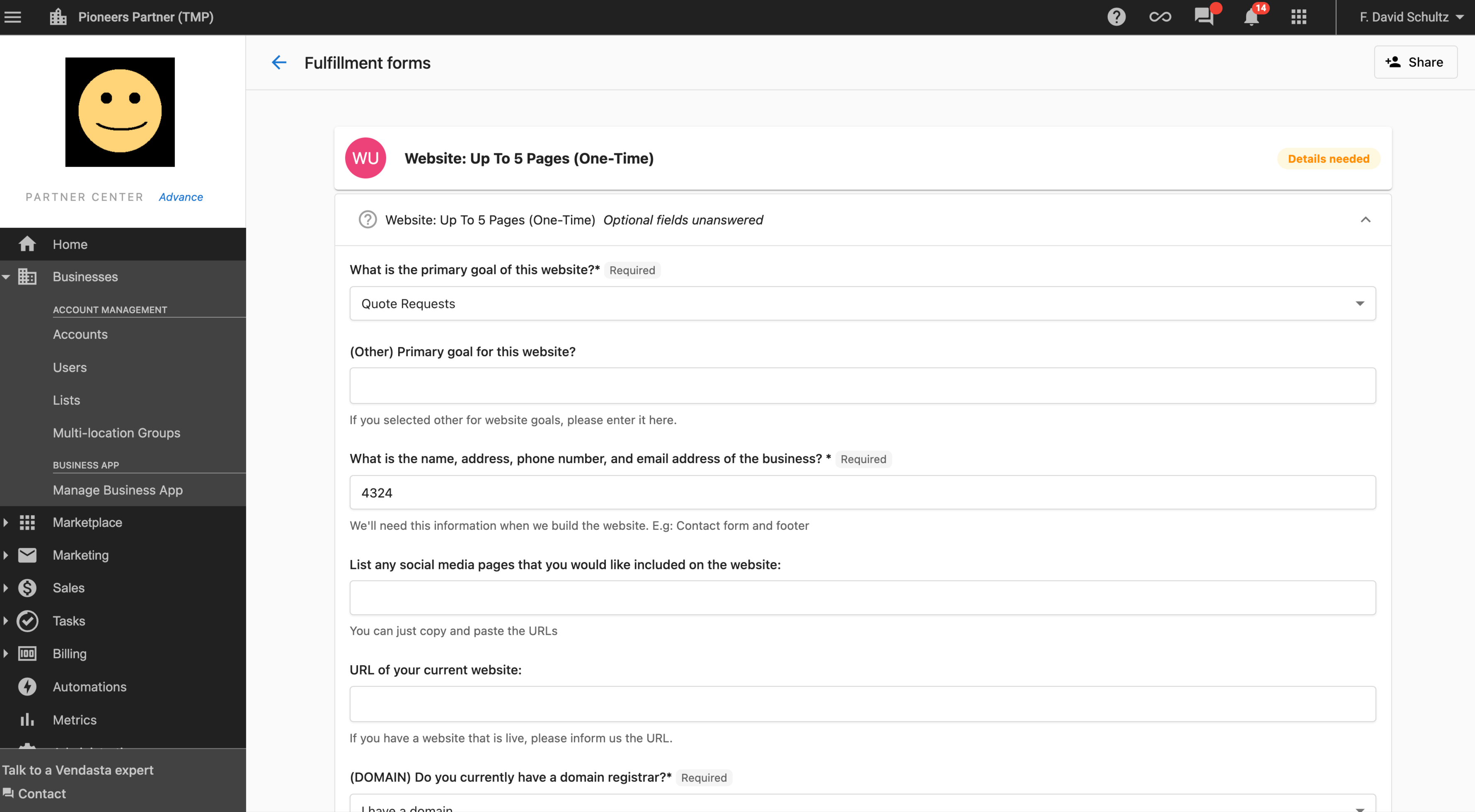
Form Completion Process
Required Fields:
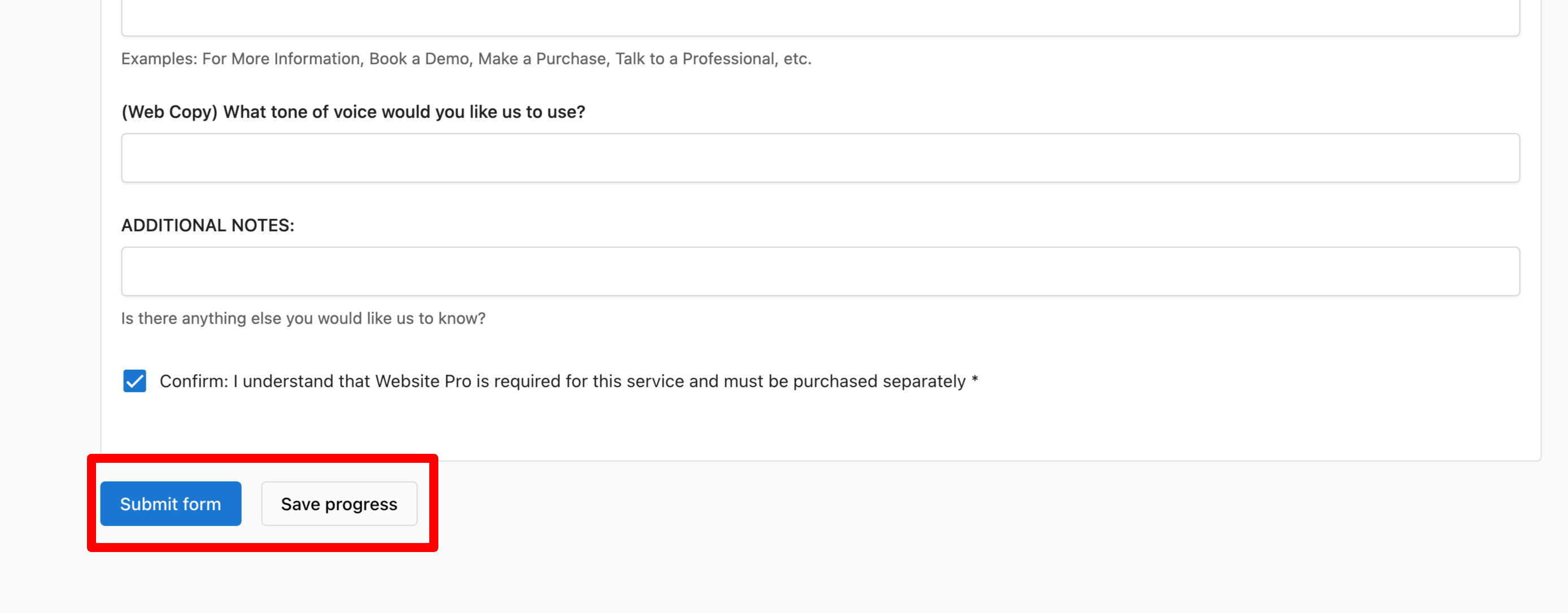
- All required fields must be completed before submission
- Required fields are marked with an asterisk (*)
- Form cannot be submitted until all required information is provided
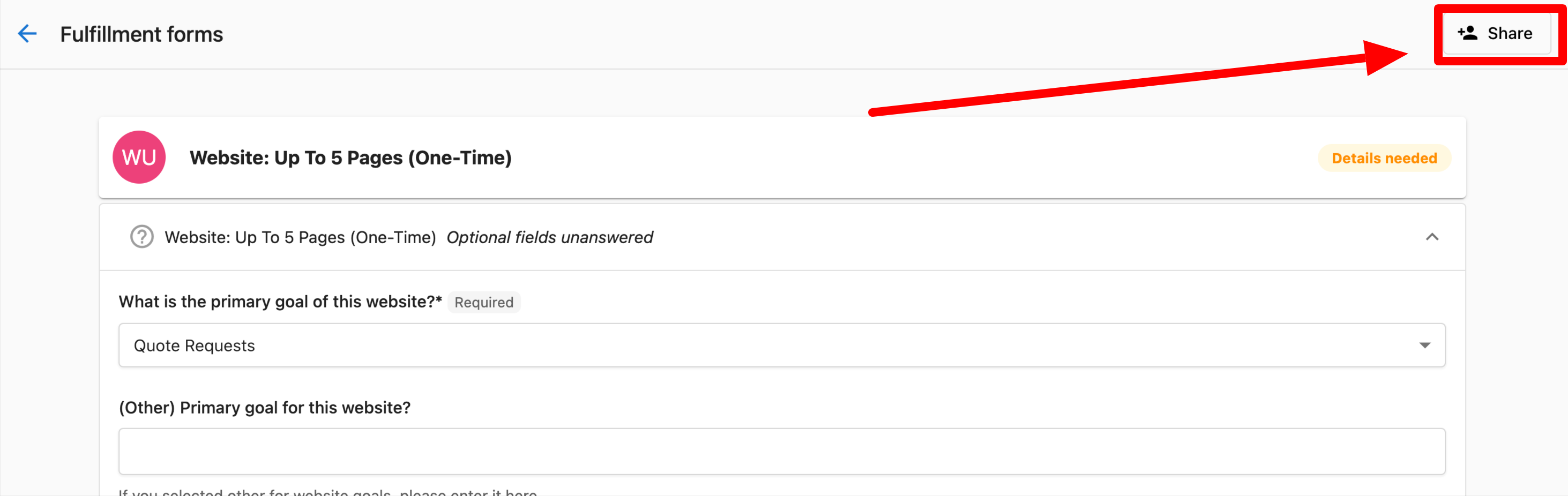
Form Sharing:
- Click the "Share" button at the top of the form
- Enter email address of person to share with
- Click "Share"
- Recipient receives email with form access link
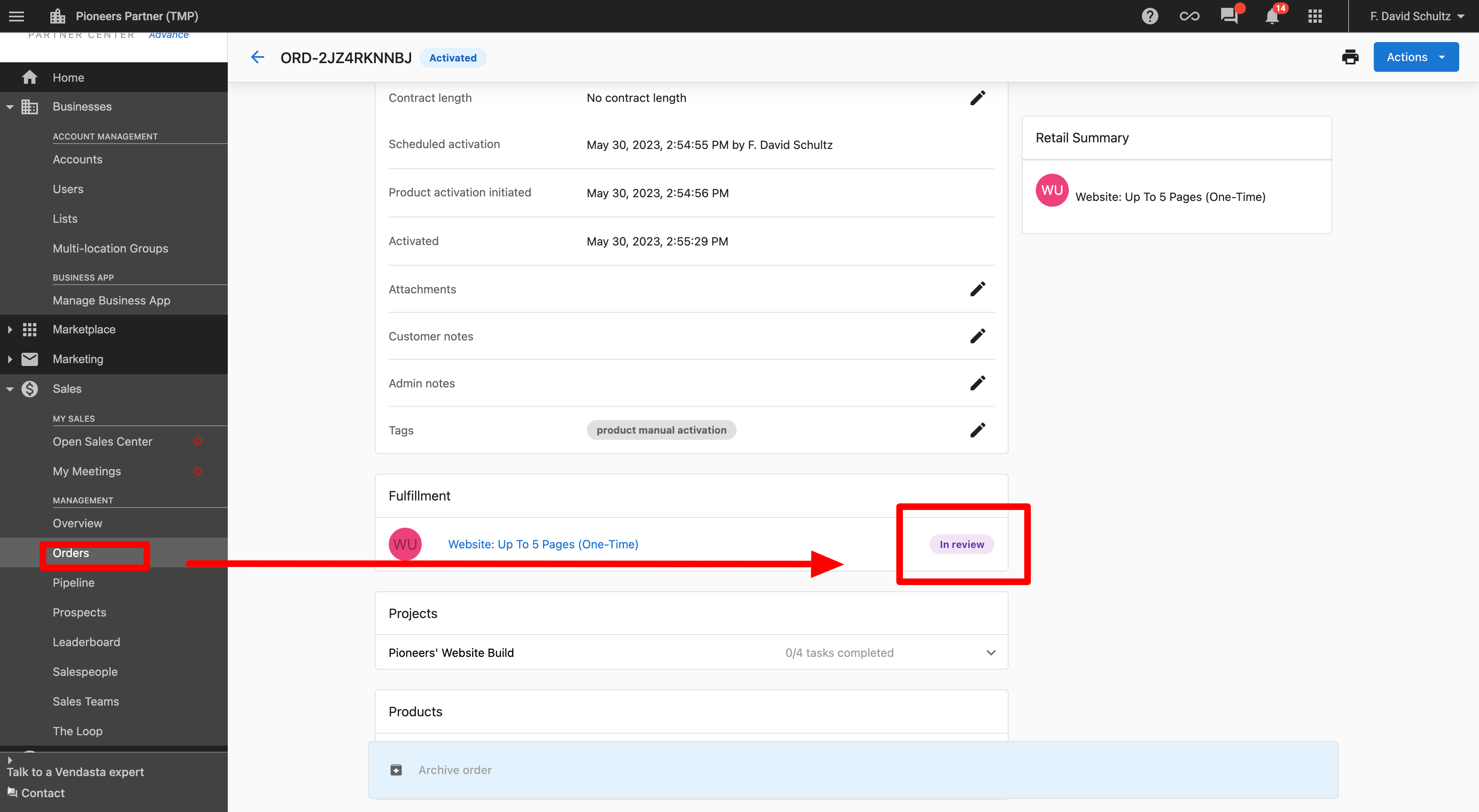
Form Status Tracking
Form Statuses:
- Not Started: Form sent but not yet opened by customer
- In Progress: Customer has started but not submitted the form
- Completed: Form successfully submitted with all required information
Tracking Access:
- Form status can be tracked from Order Details page in Partner Center
- Real-time updates on form progress and completion
Notifications for Fulfillment Forms
Partner Notifications:
- Notification when form is submitted by customer
- Alert when form remains incomplete after specified period
Customer Notifications:
- Notification when they need to complete a form
- Updates when shared forms are viewed or completed
Configuration Best Practices
Workflow Configuration
- Configure workflows to match your business processes
- Enable appropriate submission actions for different user types
- Set up email notifications to keep stakeholders informed
- Customize Terms of Service to reflect your business terms
Permission Management
- Assign appropriate permission levels based on job roles
- Regularly review user permissions to ensure they remain appropriate
- Use "Can Manage Orders" permission for users who need approval capabilities
- Limit billing permissions to appropriate financial stakeholders
Fulfillment Forms
- Use fulfillment forms for orders requiring additional customer information
- Ensure forms are clear and specify all required fields
- Set up appropriate notifications for form completion tracking
- Train customers on form sharing capabilities for complex requirements
Email and Notification Setup
- Configure email notifications to keep all stakeholders informed
- Customize notification content to match your brand and communication style
- Set up appropriate notification recipients for different order types
- Test notification delivery to ensure proper communication flow
Can I change order permissions after they've been set?
Yes, order permissions can be modified at any time through the Administration → Order Settings section. Changes take effect immediately for affected users.
What happens if a customer doesn't complete a fulfillment form?
Partners receive notifications when forms remain incomplete. The order typically cannot be fully processed until all required fulfillment information is submitted.
Can multiple people work on the same fulfillment form?
Yes, customers can share fulfillment forms with others who may have additional information needed for completion. All recipients can access and contribute to the form.
How do I know if a user has the right permissions for order management?
User permissions can be reviewed in the administration section. Users with "Can Manage Orders" permission can approve, decline, and activate orders, while those without this permission have salesperson-level access.
Can I customize the email templates for order notifications?
Yes, email notifications for Contract Awaiting Approval, Order Processed, and Order Declined can be customized through the order configuration settings.
What's the difference between internal custom forms and fulfillment forms?
Internal custom forms are for internal use only and not shared with vendors, while fulfillment forms are sent to customers to gather additional information needed to complete orders.
Can I prevent salespeople from performing certain actions?
Yes, the workflow configuration allows you to control various salesperson capabilities, including preventing them from selling standalone products, adding tags, or performing other specific actions.
How do I set up customer payment collection for salespeople?
Enable "Orders sent for approval by salespeople can accept payment" in the Salesperson Submit Actions configuration. This allows salespeople to send orders that can collect customer payments during approval.
Can admins bypass the normal approval workflow?
Yes, admin submit actions can be configured to allow admins to bypass the approval workflow and activate orders instantly when appropriate.