Conversations Overview
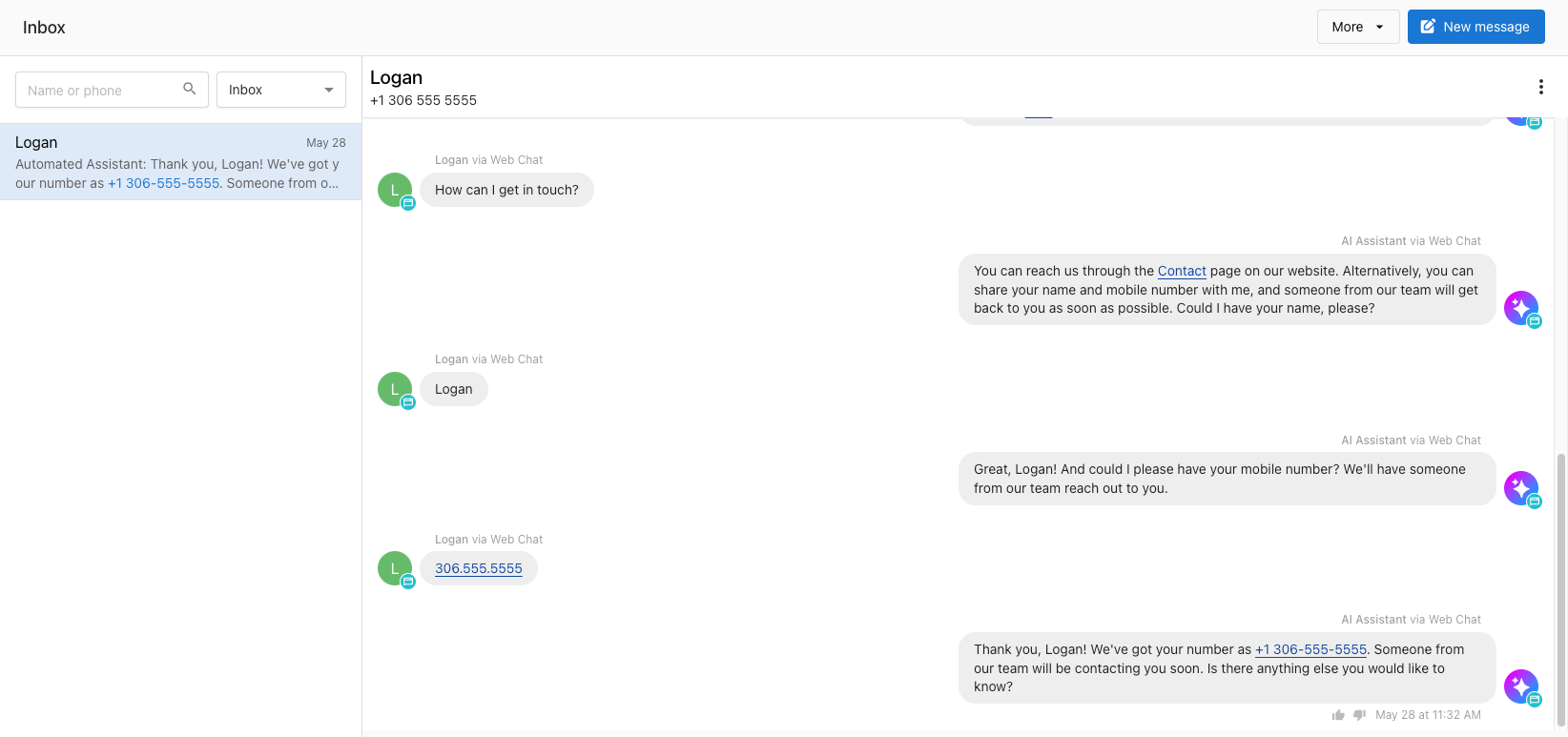
Conversations in Business App brings customer messages from email, Facebook, Instagram, website forms, AI web chat, SMS, and WhatsApp into one shared team inbox. Conversations AI Pro and Premium add the AI-assisted web chat widget, SMS, and WhatsApp.
What is Conversations?
Conversations centralizes customer messaging with integrations to email, Facebook, Instagram, WhatsApp, and more. It eliminates the need for juggling multiple communication tools by bringing everything into one shared team interface.
Core Benefits
- Centralized Communication: All customer messages in one place across channels
- Team Collaboration: Shared conversations that any team member can handle
- Lead Capture: Capture leads from website forms and follow up immediately
- 24/7 Availability: AI-powered chat widget handles customers outside business hours
- Multi-Location Support: Manage conversations across multiple business locations
Standard Features (Included)
Every Business App account includes these messaging capabilities:
Email Integration
- Send and receive emails from a shared business email address
- Team members can collaborate on email conversations
- Automatic contact creation from email interactions
Social Media Integration
- Facebook Pages: Connect and respond to Facebook messages
- Instagram Business: Manage Instagram direct messages
- Available worldwide
Website Lead Capture
- Install forms on business websites to capture contact details
- Automatically create conversations from form submissions
- Follow up with leads via email or SMS
Reputation events
- Reputation activities for NPS feedback and Review matched appear in Conversations as conversation events.
- NPS feedback updates are applied to the existing Conversations event for that activity, so the conversation shows the latest feedback without duplicate events.
- Teams can use these events to track customer sentiment in the same Conversations inbox used for other customer conversations.
Team Features
- Shared team interface - no messages tied to individual team members
- Everyone can view and participate in customer conversations
- Collaborative customer experience delivery
Conversations timeline activity
- The Conversations inbox timeline includes both customer messages and system-generated activity updates.
- Reputation activity appears in the timeline when available, including NPS feedback and review matched events.
- This gives teams additional context in the same thread while keeping regular messaging workflows unchanged.
Reputation activity in Conversations
- NPS feedback and review matched updates appear as conversation activities in Conversations
- These updates stay in the same customer conversation timeline as other interactions
- Teams can review customer sentiment and review-attribution context without leaving Conversations
- Existing messaging and review request workflows continue in the same Conversations experience
Conversations activity events
- NPS Feedback events appear as inbound timeline events with their corresponding event icon and the title Contact has submitted NPS survey.
- Review Matched events appear as inbound timeline events with their corresponding event icon and the title Review Matched.
- Multiline NPS feedback is displayed with preserved line breaks in the inbox timeline.
Pro Features (Upgrade)
Conversations AI Pro and Premium add these features:
AI-Assisted Web Chat Widget
- 24/7 AI assistant for website visitors
- Responds in 40+ languages including English, Spanish, French, German, Italian, and more
- Collects visitor contact information for follow-up
- Smooth handover from AI to human agents
- Available worldwide for any website
SMS Messaging (US & Canada)
- Unlimited one-on-one SMS messaging with customers
- Automatic local phone number assignment
- A2P 10DLC registration included for US businesses
- Integration with CRM for automatic contact creation
WhatsApp Integration (International)
- Connect WhatsApp Business accounts
- Essential for businesses outside US/Canada where WhatsApp is preferred
- Manage WhatsApp conversations alongside other channels
Getting Started
- Enable Conversations: Turn on the feature in Partner Center
- Connect Channels: Set up email, social media, and other integrations
- Configure AI: Set up web chat widget and train AI knowledge base
- Team Training: Get your team familiar with the shared Conversations interface
Feature Availability by Region
| United States | Canada | Int'l | |
|---|---|---|---|
| SMS Messaging | ✓ REQUIRES PRO | ✓ REQUIRES PRO | Not available |
| AI-assisted Web Chat Lead Capture | ✓ REQUIRES PRO | ✓ REQUIRES PRO | ✓ REQUIRES PRO |
| Facebook Business Messenger | ✓ | ✓ | ✓ |
| Instagram Messenger | ✓ | ✓ | ✓ |
| WhatsApp Integration | ✓ REQUIRES PRO | ✓ REQUIRES PRO | ✓ REQUIRES PRO |
| ✓ | ✓ | ✓ | |
| Web Forms | ✓ | ✓ | ✓ |
Frequently Asked Questions
Can Conversations in Business App integrate with other CRMs or Messaging systems?
Businesses can centralize their customer and contact data in the Business App CRM using available integrations with Zapier, Quickbooks, and more. Additionally, automations can be created that send messages when certain events happen.
What automations are available for Conversations in Business App?
Automations in Business App includes triggers when a message is received, and actions to send an SMS or email. You can build automated workflows for your business with the Automations system, along with all the integrations available in Business App.
Is there a per-use cost for the AI-assisted web chat?
There's no per use cost for AI in Conversations AI. Unlimited AI responses from the AI-assisted web chat lead capture is included.
What languages does the AI support?
Your AI assistant can respond to leads in over 40 languages, including English, Spanish, French, German, Italian, Turkish, Polish, Ukrainian, Russian, Japanese, Chinese and many more.
If we install the Conversations AI chat on our website, will it be only AI agent answering customers or will real agents talk to customers?
The web chat is 100% AI-managed lead capture. Small businesses are busy, and can't always reply instantly – that's why the AI assistant will get a website visitor's name and number, and then notify the business they have a new lead – the business can reply via SMS as soon as possible, and move the conversation off the website and onto the customer's phone.
How much does the chatbot know about the business? Can it answer questions?
The AI assistant can access "knowledge" from the business profile, so it can answer questions about services, location and contact info, and hours. It can also be trained on the text from a business website. You can also add additional text Q&A 'knowledge' to the AI assistant so it can answer frequently asked questions from any supplied text.
How do I install the web chat widget?
The web chat widget can be installed on any website. To install, copy and paste the widget install code into the <head> element of your website, typically just before the closing </head> tag.
Can WhatsApp send group messages?
No. WhatsApp messages go to individual contacts only, the same as the other messaging channels.
Which channels can I bring into Conversations?
Every Business App account includes email, Facebook Pages messages, Instagram Business direct messages, and website forms. Conversations AI Pro and Premium add the AI-assisted web chat widget, SMS messaging, and WhatsApp. See Feature Availability by Region for where each channel is available.
What can businesses do with SMS in Conversations?
With Conversations AI Pro or Premium, businesses get unlimited one-on-one SMS messaging with customers from an automatically assigned local phone number, and A2P 10DLC registration is included for US businesses. SMS conversations create contacts in the CRM automatically, and businesses can follow up with web chat and form leads by SMS.