How do I manage products for an account?
What is product management for accounts?
In Partner Center, you manage an account's products from the Products card on the account Overview in Accounts → Manage Accounts. From there you can activate products, change editions, and cancel a product or schedule its deactivation.
Product management involves activating, configuring, and maintaining products and services for business accounts. This includes selecting appropriate product editions, managing add-ons, handling upgrades and downgrades, and deactivating products when necessary.
Why is product management important?
Effective product management ensures:
- Appropriate Service Levels: Customers receive products that match their business needs and budget
- Revenue Optimization: Proper edition selection and add-on management maximizes value for both parties
- Customer Satisfaction: Right-sized products improve customer experience and reduce churn
- Operational Efficiency: Proper product configuration reduces support issues and improves service delivery
- Growth Opportunities: Strategic product management identifies expansion and upsell opportunities
What's included with product management?
Product activation
- Initial product setup and configuration
- Edition selection and customization
- Integration setup and testing
- Launch coordination and timeline management
Edition management
- Upgrade and downgrade processing
- Feature comparison and selection
- Pricing tier management
- Transition planning and execution
Add-on services
- Supplementary feature activation
- Specialized service configuration
- Premium support options
- Integration expansions
How do I activate products?
How do I activate products from an account?
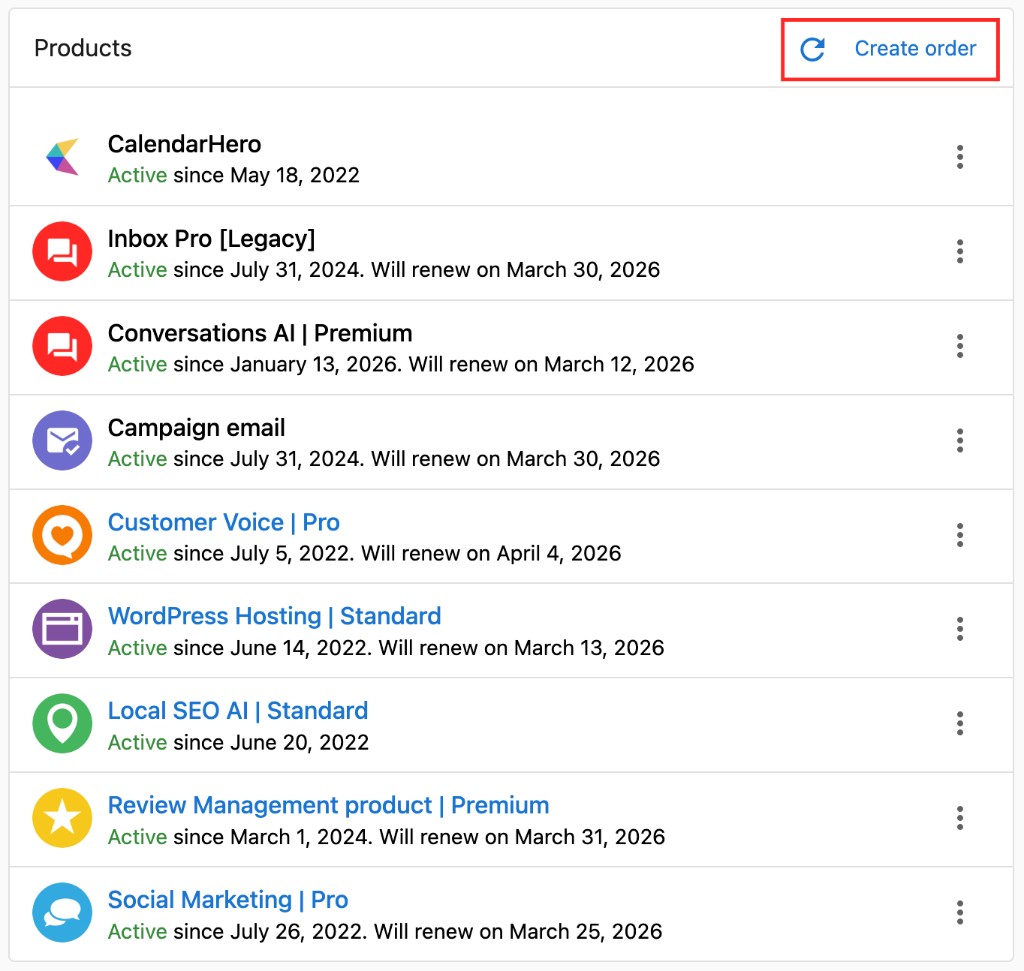
Method 1: To enable products for a customer account:
- Navigate to
Accounts→Manage Accounts - Select the target account from your account list
- Open the account details page
- Find the
Productscard on the account Overview - Click
Create order
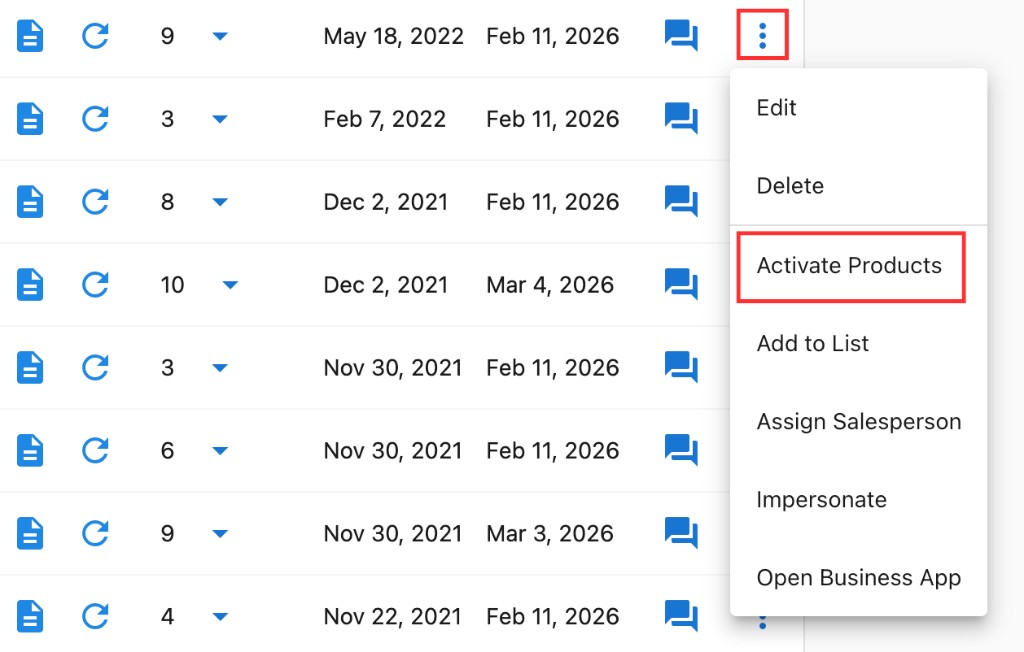
Method 2: To enable products for a customer account:
- Navigate to
Accounts→Manage Accounts - Select the target account from the account list
- Click the menu icon beside the account
- Select
Activate Products
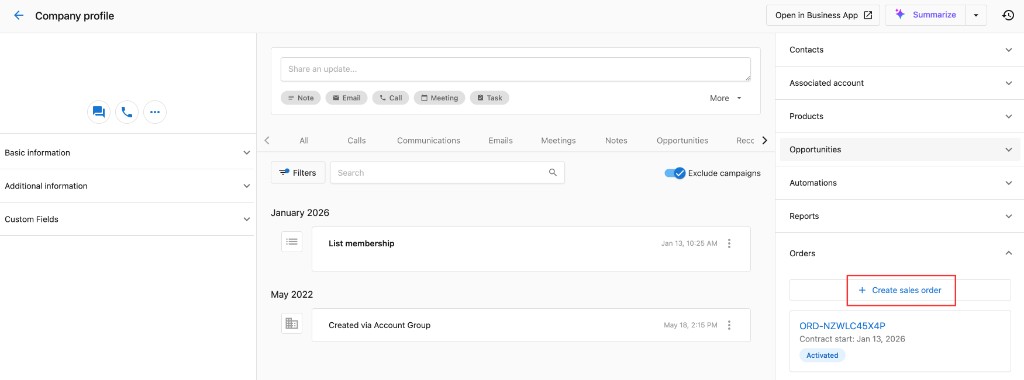
How do I activate products from the CRM?
- Navigate to
CRM→Companies - Select the target company from the table
- Find the
Orderpanel on the right - Click
Create Sales Order - Follow the ordering process to place the Order
How do I build my product catalog?
- You can find the list of products available through the marketplace
- Click on the products that you would like to add to your product offerings
- Click
Start sellingon the top right to add the products to your offerings.
Activation Process:
Product activation always creates a sales order as part of the activation process. This ensures proper billing, tracking, and commerce workflow integration.
- Schedule activation during appropriate business hours
- Create sales order - Product activation automatically generates a sales order for tracking and billing
- Execute product activation following the order fulfillment workflow
- Verify product functionality after activation
- Test customer access and dashboard availability
- Provide activation confirmation with order details and next steps
How do I change a product edition?
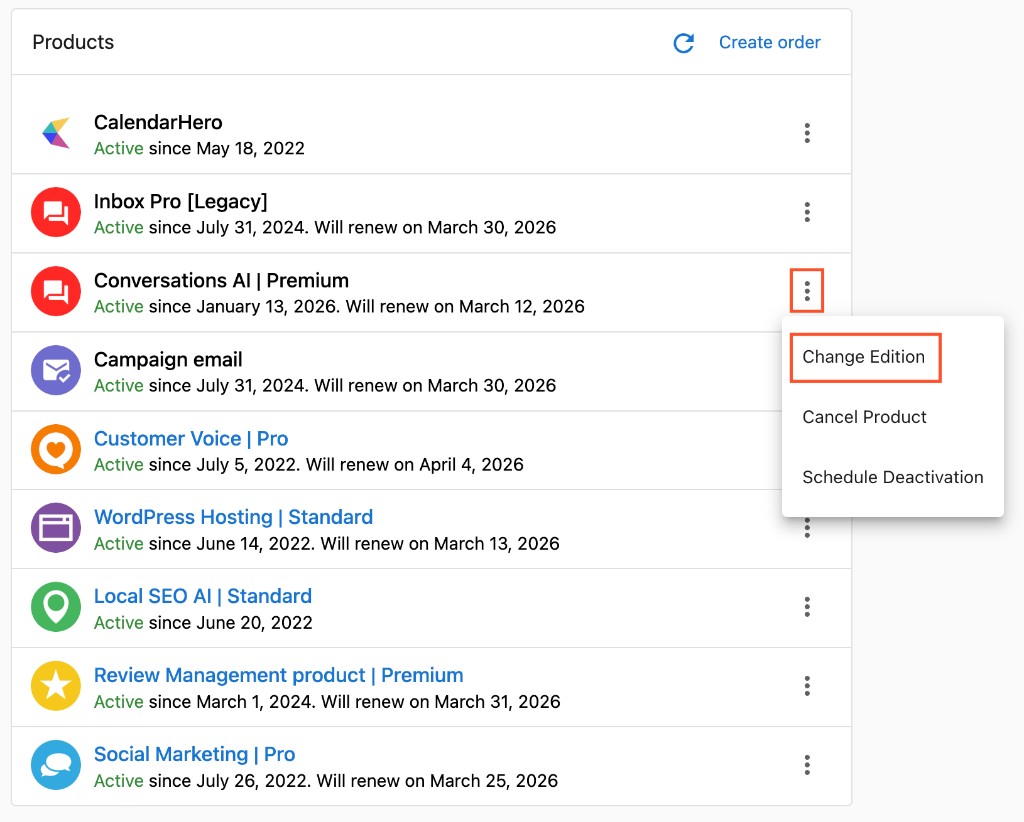
To change a product edition for an account:
- Go to
Accounts→Manage Accounts. - Open the account and find the
Productscard on the Overview. - Click the menu icon beside the product you want to change and select
Change edition. - Select the desired edition and confirm.
Upgrading to a higher edition may incur additional charges. Some downgrades (for example, WordPress Premium) may not be supported.
How do I cancel a product?
To cancel a product for your customer:
- Go to
Accounts→Manage Accountsand open the account. - In the
Productscard on the Overview, click the menu icon beside the product and selectCancel product. - Choose when the product stops, then confirm.
Choose when the product stops
| Option | When access ends | What you are billed |
|---|---|---|
Cancel at the end of the current period | On the product's next renewal date | Nothing further — the product does not renew |
Cancel immediately | Right away | The current period was charged when it started and is not refunded automatically |
Cancel after a specified number of renewals | After the renewals you choose | Each of those renewals, then nothing |
A product cancelled for the end of the period keeps working until its renewal date — this is expected, not an error. If the client needs the product to stop now (for example, an AI receptionist that should stop answering their customers), choose Cancel immediately.
The cancellation card on the account shows the date the product will deactivate. You can also find it on the account's Activation History page.
What cancelling does and does not stop
- Future renewals stop. You are not charged for the product again after it deactivates.
- Charges already incurred still appear. Vendasta invoices at the start of each month for everything activated or renewed in the previous month, so a product cancelled this month can still appear on your next invoice for a renewal that already happened. See My billing.
- Commitments continue. A product on a commitment (for example, an annual contract) bills through the end of the commitment, even if it is cancelled or the account is deleted.
- Your client's billing is separate. Every activated product creates a wholesale subscription (you to Vendasta) and a retail subscription (you to your client). After cancelling, check the client's retail subscription in
Commerce→Subscriptionsso they are not invoiced for a product they no longer have. See Subscription management.
To ask for money back on a charge that has already been made, submit a billing request.
Undo a cancellation
Until the deactivation date, click the menu icon beside the product and select Undo Cancellation. The product continues renewing as before.
Cancel products or delete the account?
If a client is leaving, cancel their products — do not delete the account to stop billing. Deleting an account cancels its products and removes all of its data permanently, but it does not end commitment billing early. See Delete accounts.
Manage products FAQs
Can I disable the “email all users” option during activation?
In some activation flows you can control user email notifications. If you need to avoid sending emails to all users, review the activation options and deselect bulk email notifications where available.
Can I purchase more than one domain on the same account?
Some products support multiple domains per account. Review the product’s configuration options in the Products card on the account Overview. If the option is not available, it may not be supported for that product.
Customer Communication:
- Explain feature changes clearly before processing
- Provide training for new capabilities after upgrades
- Confirm understanding of limitations after downgrades
- Document edition change reasons for future reference
Frequently asked questions (FAQs)
How do I choose the right product edition for a new customer?
Consider the customer's business size, current needs, technical sophistication, and budget. Start with an edition that meets current requirements rather than over-provisioning for potential future growth.
Can customers upgrade their product edition at any time?
Most systems allow immediate upgrades with pro-rated billing adjustments. Check your specific billing policies and communicate any timing considerations to customers.
What happens to customer data when I downgrade their product edition?
Data is typically preserved, but access to advanced features may be restricted. Some advanced reports or configurations may become unavailable. Always communicate these limitations before processing downgrades.
Can I activate multiple products for the same account simultaneously?
Yes, most accounts can have multiple active products. Consider integration requirements and ensure the combination provides value without unnecessary overlap or complexity.
What should I do if a product activation fails?
Check integration requirements, verify account setup is complete, review any error messages, and contact technical support if needed. Document the issue for future reference and resolution.
How do I track which products are performing well for different customer types?
Use reporting tools to analyze product adoption, usage patterns, and customer satisfaction by business category, size, or other attributes. This helps inform future product recommendations.
Can customers change their own product settings after activation?
This depends on your system configuration and customer permission settings. Many systems allow customers to modify some settings while restricting access to billing and core configuration options.
When viewing activation history, what timezone is used in the timestamps?
The timezone displayed reflects the local time of the current user.