Vendasta Ads in Partner Center
Overview
Plan, propose, and order ad campaigns for Google, Bing, and Meta in minutes, all without leaving Partner Center. This article covers how to create a plan, share a branded proposal with your client, and turn your plan into a live campaign.
Vendasta Ads is in open beta, available to Partner Center users serving businesses in the United States and Canada that don't already have a dedicated MatchCraft instance.
If you're looking for a fully managed, do-it-with-me campaign instead, see Specialty Ad Campaign.
Watch the full walkthrough: build an AI-generated plan, share the branded proposal with your client, and turn it into a live, managed campaign, all without leaving Partner Center.
Before you start
-
Eligibility: Vendasta Ads is available to all Partner Center users who serve businesses located in the United States and Canada, and who don't have a dedicated MatchCraft instance.
- If your business has a MatchCraft instance, create ad plans from MatchCraft → Manage → Plans instead.
-
No setup required:
Adsappears automatically in the Partner Center left navigation. There's no activation step.
Creating an ad plan
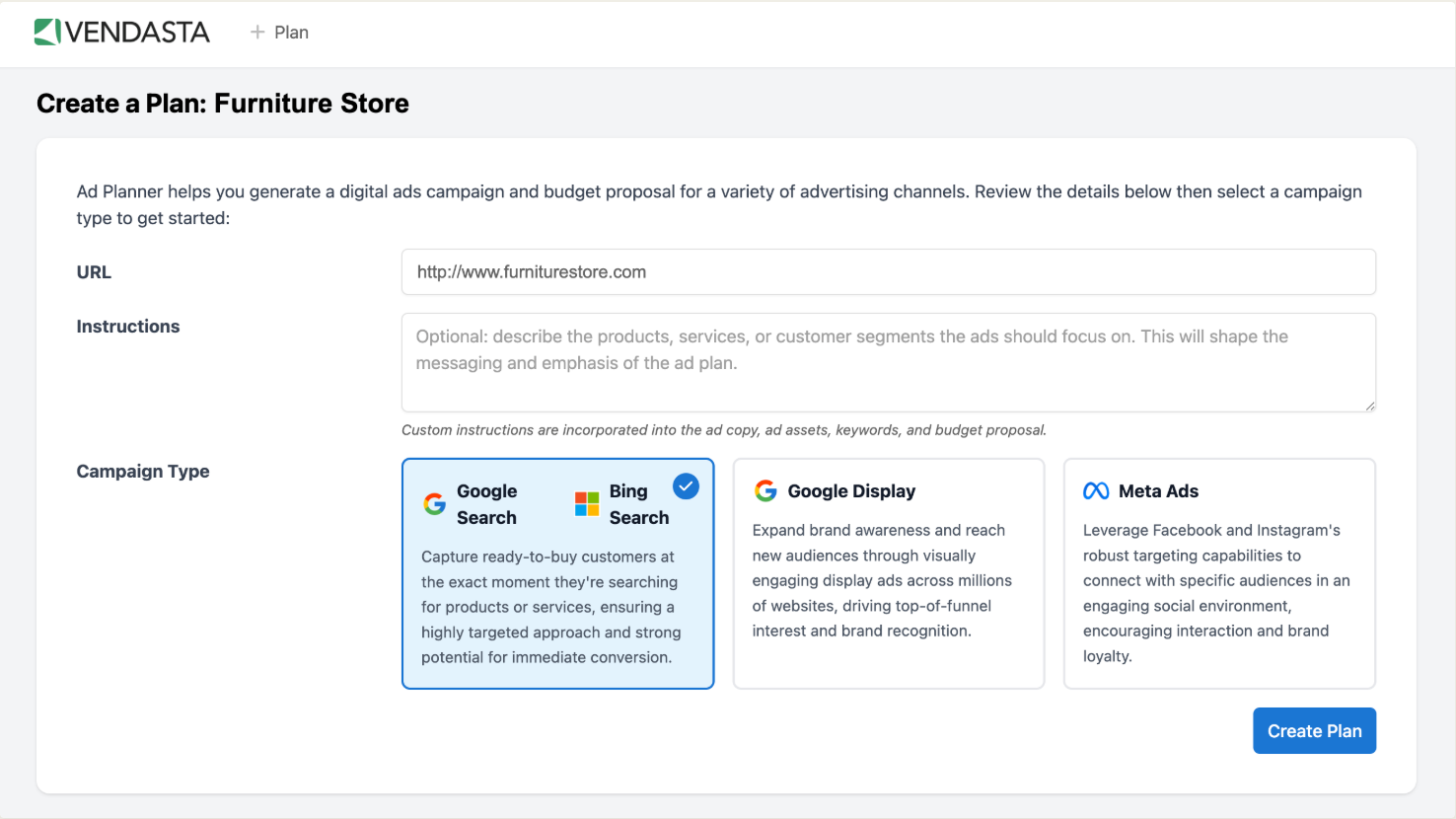
- Go to
Partner Center→Ads→Ad plans→Create new plan. - Review the auto-populated website URL, and correct it if needed.
- Choose one ad network: Google/Bing Search, Google Display, or Meta (Facebook and Instagram). Each plan covers a single network.
- Add custom instructions if you want to shape the plan. For example, describe the products, services, or customer segments the ads should focus on.
- Vendasta Ads generates ad copy, keywords, audience targeting, and up to three monthly budget options in about a minute.
- Review the plan and edit any part of it, including keywords, copy, audiences, or budget, before sharing it.
Changing the geography or keywords can shift the recommended budget and expected performance, so re-check both after making edits.
Sharing a proposal with your client
Every plan includes a public, partner-branded proposal page showing the campaign overview, ad previews, and budget options.
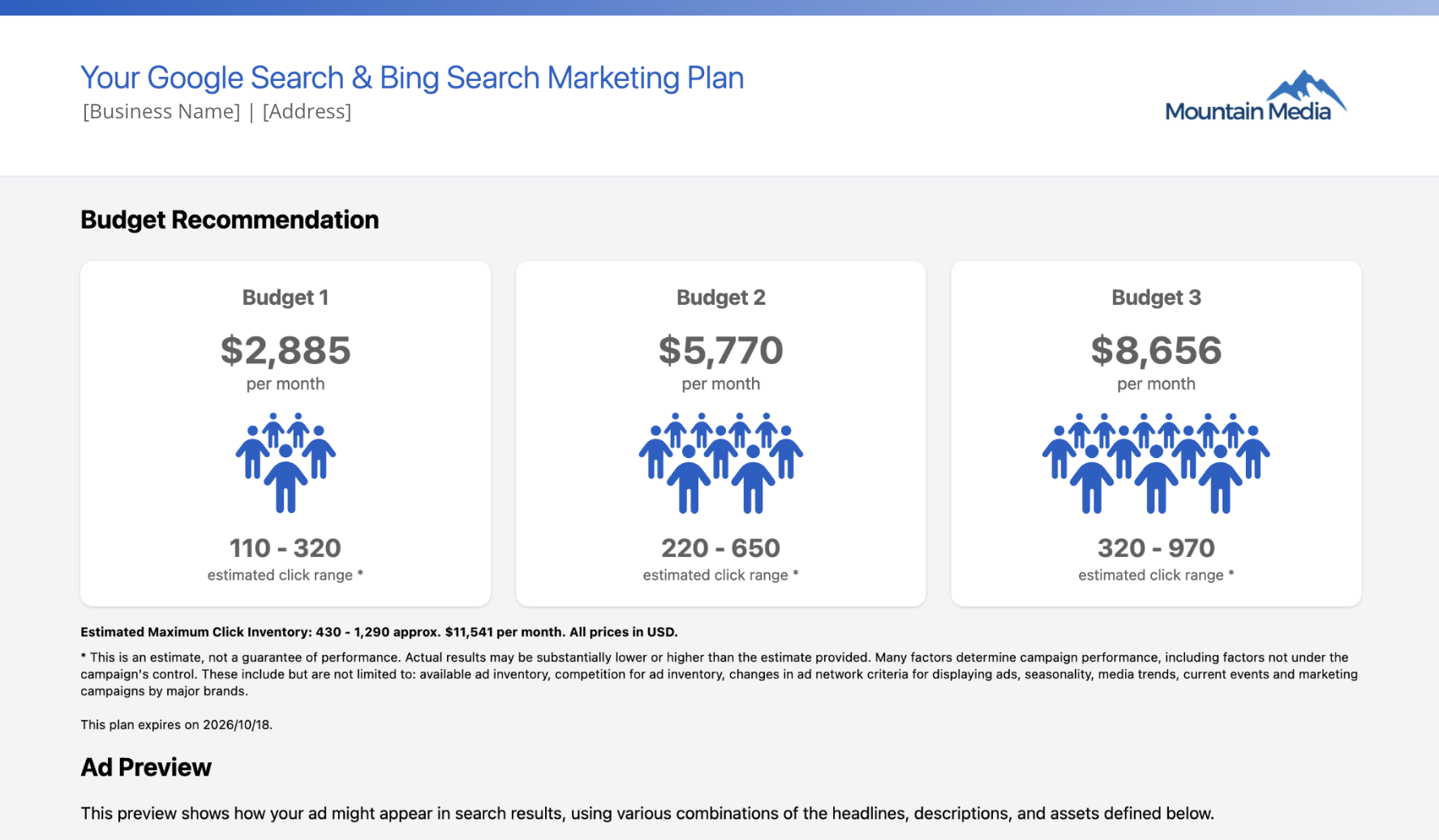
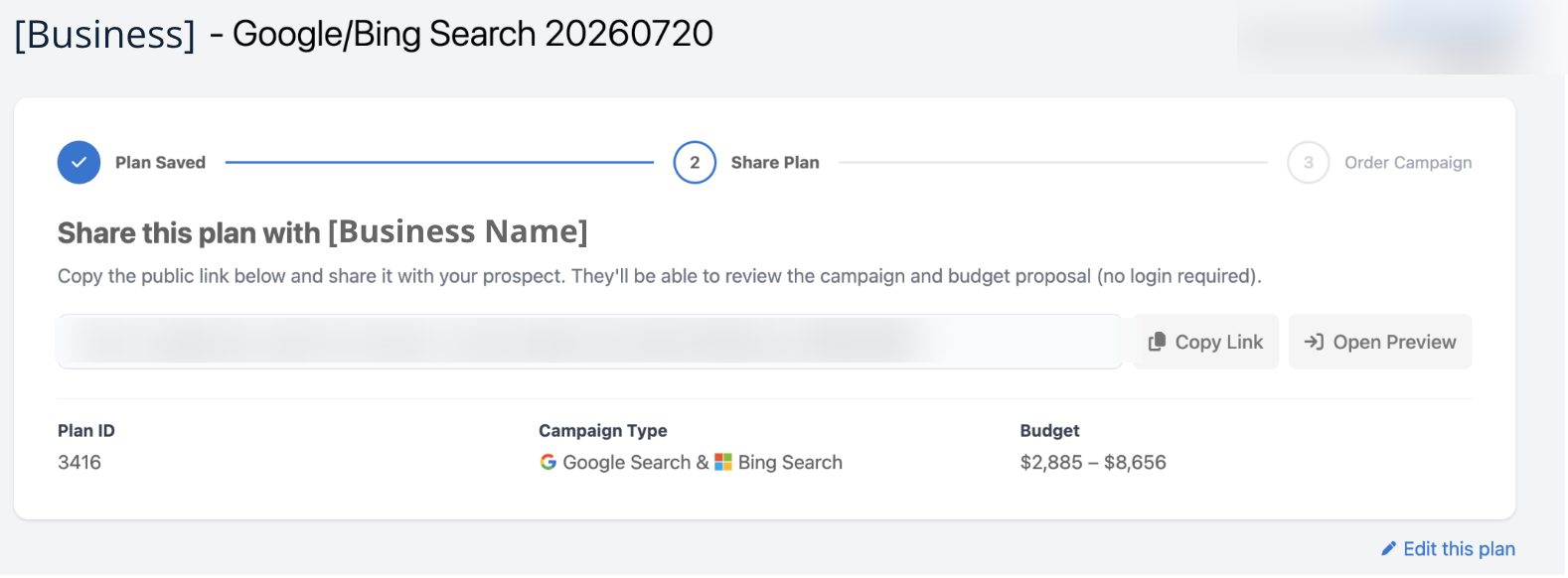
- From the plan, copy the shareable proposal link.
- Send the link to your client. No login is required for them to view it.
Turning a plan into a live campaign
- Once your client approves the proposal, return to the plan in
Partner Center→Ads→Ad plans. - Select Order from the Ad plans dashboard, or Order campaign from the bottom of the plan.
- Review the pricing breakdown, then add it to a new or existing order for the client's account.
- Place the order.
Vendasta Services launches and manages the campaign for its duration:
- Campaigns are built and launched the same day the order is placed.
- Call tracking, if ordered, is set up within 2 business days.
- Conversion tracking can be set up on request. Coordinate with your Vendasta Services representative.
Viewing campaigns and reporting
- Campaign overview: Go to
Partner Center→Ads→Ad campaignsfor a centralized dashboard of every campaign ordered from an ad plan, including currently live and past campaigns. - Performance reporting: Reporting for each campaign is available in Advertising Intelligence. If the client's account doesn't already have Advertising Intelligence active, it's activated automatically at no charge.
Making changes after a campaign is ordered
Vendasta's platform and team of experts continuously optimize live campaigns. Certain parameters can also be updated on request:
- Budget changes: Go to
Partner Center→Manage Accounts, select the account, then Request a Spend Change. Submit the request at least 5 business days before the billing cycle renews. - Creative, copy, or keyword edits: One round of edits is included per billing cycle at no extra charge. Additional edits are billed hourly. Contact your Vendasta Services representative with the details of what you need changed, then order the Hourly Charge SKU in Partner Center once the scope of work is agreed on.
- One-time promotions: Create and order a new short-term plan for the promotional window instead of editing the live campaign.
Optimizing for performance
- Single-channel plans: Each plan targets one channel, either Meta, Google Display, or Google & Bing Search, so the proposed budget and strategy are tailored to that channel.
- Automated optimization: Campaigns run on the Vendasta Ads platform's built-in optimization engines, which continuously test and refine performance.
- Multiple creative assets: Vendasta Services supplies multiple headlines, descriptions, and images, letting the platform's machine learning serve the best-performing combinations in real time.
- Outcome-based bidding: Bidding is optimized toward the outcomes that matter, whether that's conversions, lower cost-per-acquisition, or overall performance, and spend is continuously steered toward the audiences, placements, and creatives that deliver results.
Troubleshooting
-
Plan won't generate: Confirm the website URL is public and loads without a login. Try removing tracking parameters from the URL.
-
Budget options are too low: Search budget proposals are based on your geographic targeting and positive keywords. The cap prevents proposing a budget that the campaign's targeting can't actually spend, so Vendasta Ads won't sell more than the available keywords and geography can support. To raise the maximum, broaden the targeting with one of these changes:
- Expand geographic targeting: Increase the radius or add locations to reach a larger audience.
- Add an ad group: More ad groups broaden coverage and raise the recommended spend.
- Edit positive keywords: Add positive keywords to existing ad groups to capture more search volume.
-
Proposal link isn't loading for the client: Confirm the plan has been shared, not just created, then regenerate the share link from the plan.
-
Ordering option is missing: Confirm the plan covers a supported network (Google/Bing Search, Google Display, or Meta) and that the account doesn't have a dedicated MatchCraft instance blocking Partner Center Ads access.
-
Need LinkedIn, YouTube, TikTok, Performance Max, or Yelp: These networks aren't available as ad plans yet. Order a Specialty Ad Campaign from the Marketplace instead.
FAQ
Do I need a dedicated MatchCraft instance to use this?
No. Vendasta Ads in Partner Center is built for partners who don't have a dedicated MatchCraft instance. If your business does have one, create plans from MatchCraft → Manage → Plans instead.
Can I combine Google, Bing, and Meta in a single plan?
No. Each plan targets one network: Google/Bing Search, Google Display, or Meta. Create a separate plan for each network you want to propose, so the budget and strategy stay tailored to that channel.
Does my client need an account to view the proposal?
No. The proposal page is public and partner-branded. Anyone with the link can view the campaign overview, ad previews, and budget options without logging in.
What happens after I place the order?
Vendasta Services builds and launches the campaign the same day the order is placed. Call tracking, if ordered, is set up within 2 business days, and conversion tracking can be arranged with your Vendasta Services representative.
Can I make changes to a campaign after it's live?
Yes. One round of creative, copy, or keyword edits is included per billing cycle at no extra charge. Additional edits are billed hourly through the Hourly Charge SKU. Budget changes must be requested at least 5 business days before the billing cycle renews.