Paramètres de facturation par défaut
Les paramètres de facturation par défaut appliquent la configuration de facturation d'abonnement de votre choix à chaque nouveau compte que vous créez. Vous les définissez une seule fois ; les nouveaux comptes reçoivent automatiquement ces paramètres. Les comptes existants ne sont pas modifiés.
Ce que c'est
La facturation d'abonnement crée et envoie des factures ou débite les moyens de paiement enregistrés pour les abonnements récurrents. Les paramètres par défaut dans Administration → Default billing settings s'appliquent à tous les nouveaux comptes afin que vous n'ayez pas à configurer la facturation manuellement pour chaque compte.
Pourquoi c'est important
- Moins de travail manuel – Les nouveaux comptes reçoivent automatiquement votre configuration de facturation préférée
- Cohérence – Mêmes pratiques de facturation pour tous les nouveaux clients
- Flexibilité – Modifiez n'importe quel compte individuel à partir de ses propres paramètres de facturation sous
Accounts→Manage Accounts
Ce que vous pouvez configurer
Subscriptions– Un bouton qui active la facturation d'abonnement pour les nouveaux comptes. Il est désactivé (Off) par défautPayment collection– La méthode utilisée pour percevoir le paiement d'un abonnementSubscription renewal– Ce qui se passe lors du renouvellement d'un abonnement. Les options incluentDo nothingetCreate a draft invoiceSubscription scheduling– Indique si chaque abonnement se renouvelle à sa propre date de début, ou si tous les abonnements sont alignés sur une date communeMemo– Texte libre imprimé au bas de chaque facture générée par la facturation d'abonnement
La page affiche une bannière indiquant que ces paramètres s'appliquent uniquement aux comptes créés après l'enregistrement. Les comptes existants conservent leurs paramètres actuels.
Comment configurer la facturation par défaut
- Allez dans
Partner Center→Administration→Default billing settings - Activez le bouton
Subscriptions. Il est désactivé (Off) par défaut - Réglez
Payment collectionsur la méthode que vous souhaitez utiliser pour percevoir le paiement - Réglez
Subscription renewal. ChoisissezDo nothingsi vous ne voulez rien générer au renouvellement, ouCreate a draft invoicesi vous souhaitez une facture que vous examinez avant envoi - Réglez
Subscription scheduling. Renouvelez chaque abonnement à sa propre date de début, ou alignez les abonnements sur une date commune - Ajoutez un
Memosi vous souhaitez un texte fixe au bas de chaque facture générée par la facturation d'abonnement - Vérifiez les paramètres et sélectionnez
Save
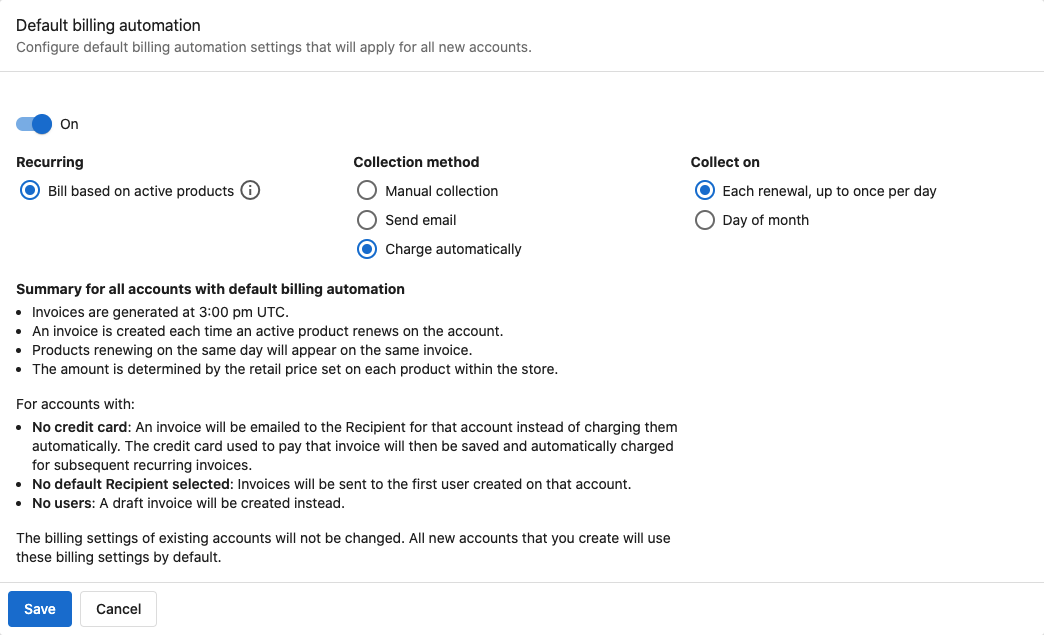
Les nouveaux comptes recevront automatiquement ces paramètres dans leur configuration de facturation.
Les paramètres de facturation par défaut ne modifient pas les comptes existants. Seuls les comptes créés après l'enregistrement utiliseront ces valeurs par défaut.
Modifier la facturation d'un compte individuel
Vous pouvez modifier la facturation de n'importe quel compte à tout moment :
- Allez dans
Partner Center→Accounts→Manage Accounts - Ouvrez le compte
- Modifiez les paramètres de facturation propres à ce compte
Pour en savoir plus sur la facturation par compte, consultez Gestion des abonnements.
Valeurs par défaut spécifiques à un marché
Avec plusieurs marchés, vous pouvez définir des paramètres de facturation par défaut différents pour chaque marché. Utilisez le sélecteur de marché sur la page Default billing settings.
Exigence relative à la tarification des produits
Pour que l'automatisation facture correctement :
- Les prix de vente doivent être définis pour chaque produit
- Les paramètres d'abonnement doivent être corrects pour les produits récurrents
Pour facturer automatiquement en fonction des produits actifs, vous devez définir les prix de vente pour chaque produit. Sans tarification, l'automatisation ne peut pas calculer les montants.
Foire aux questions
Les paramètres de facturation par défaut affectent-ils les comptes existants ?
Non. Ils s'appliquent uniquement aux comptes créés après l'enregistrement. Les comptes existants conservent leurs paramètres de facturation actuels.
Puis-je modifier la facturation d'un compte après avoir appliqué les valeurs par défaut ?
Oui. Allez dans Accounts → Manage Accounts, ouvrez le compte et modifiez les paramètres de facturation propres à ce compte.
Dois-je définir les prix des produits pour que l'automatisation fonctionne ?
Oui. Définissez les prix de vente pour chaque produit afin que la facturation automatique puisse calculer les montants.
Puis-je avoir des valeurs par défaut différentes par marché ?
Oui. Sélectionnez chaque marché sur la page Default billing settings et enregistrez des paramètres différents pour chaque marché.
À quoi sert le paramètre Payment collection ?
Payment collection définit la méthode utilisée pour percevoir le paiement d'un abonnement sur un nouveau compte. Ouvrez le champ sur la page Default billing settings pour voir les méthodes disponibles pour votre compte, et choisissez celle qui correspond à la façon dont vous souhaitez être payé.
À quoi sert le champ Memo ?
Tout ce que vous saisissez dans Memo s'imprime au bas de chaque facture générée par la facturation d'abonnement. Utilisez-le pour un texte fixe tel que des conditions de paiement ou une note de remise.
Puis-je désactiver la facturation d'abonnement par défaut plus tard ?
Oui. Allez dans Default billing settings, réglez le bouton Subscriptions sur Off, puis enregistrez. Les nouveaux comptes ne recevront plus les valeurs par défaut ; les comptes existants ne sont pas modifiés.
Mes clients reçoivent des e-mails de facture inattendus : comment puis-je arrêter cela ?
Cela se produit lorsque la facturation d'abonnement est activée et configurée pour générer des factures au renouvellement. Pour arrêter l'envoi des e-mails de facture :
- Allez dans
Partner Center→Administration→Default billing settingset vérifiez si le boutonSubscriptionsest activé - Réglez
Subscription renewalsurDo nothingafin que les renouvellements ne génèrent plus de facture, puis sélectionnezSave - Cela ne modifie la valeur par défaut que pour les nouveaux comptes. Pour un compte qui envoie déjà des factures, modifiez les paramètres de facturation propres à ce compte
Les paramètres de compte se trouvent sous Partner Center → Accounts → Manage Accounts, puis ouvrez le compte concerné.